商品説明
MUZZLE FOR DRUFFLE | PC + QUEST
Pull it up to mute. Make the tag your own.
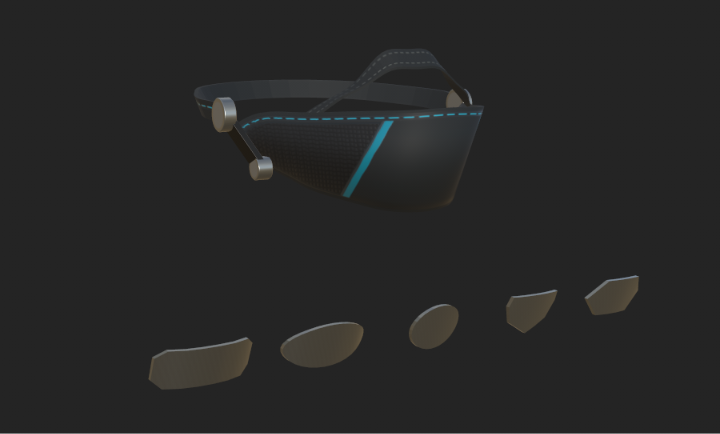
Muzzle is a flip-up accessory for Druffle in VRChat. Give it your own logo, initials or artwork, switch between six finishes on PC, and wear the baked Cyberpunk version on Quest.
PC FEATURES
• Pull up to mute. With the included Windows OSC helper running, raising the muzzle mutes your mic. Lowering it releases a mute applied by the helper. You can also let friends raise it and trigger the mute through the Player Interactions and Player Mute Interaction settings.
• Show your status. A blue AFK badge appears when you go AFK, a red mic badge shows when you’re muted, and the optional voice meter responds to your voice.
• Switch between six finishes in-game -> Gothic, Formal, Cyberpunk, Medieval, Black Checker and Plush.
• Light up the Cyberpunk trim with Cyan Trace, Voice-Reactive Trim, AudioLink Bands or RGB Cycle. AudioLink follows world audio in supported worlds and displays a steady cyan trace elsewhere.
• Show or hide the muzzle, choose a tag and adjust its metal hue and saturation. You can also hide the nose strap or suppress speech mouth shapes while the muzzle is raised.
• The muzzle follows Druffle’s supported face blendshapes, including adjustments to snout length, width and height.
WHAT QUEST PLAYERS SEE
The Quest prefab shows the baked Cyberpunk finish, the raised or lowered muzzle and your selected tag. You can show or hide the muzzle and tag, raise or lower the muzzle through the Expressions menu, and switch between all five tag shapes. Custom prints and engravings appear on Quest when you apply the artwork to the Quest prefab in Unity.
MAKE YOUR OWN TAG
Choose a rounded rectangle, oval, round, shield or hexagon. Open the included Tag Artwork tool in Unity, load a PNG and adjust its size, rotation and position using the front and angled previews. Apply it as a full-colour print or engraved effect to PC, Quest or both before uploading.
On PC, switch off Voice Meter to see your custom artwork while active and unmuted.
TECHNICAL SPECS
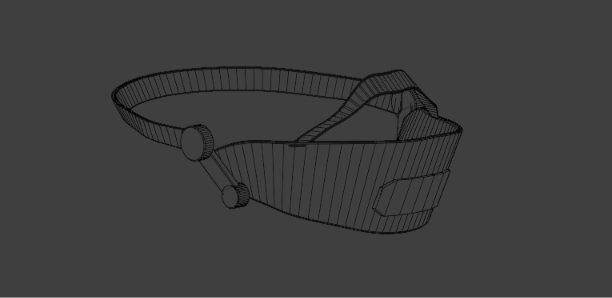
• Both platforms use a 2,820-triangle muzzle assembly. Each selectable tag adds 28–94 triangles.
• PC prefab — 3,330 triangles across all included variants, 19 mesh renderers, 2K finish textures, included PC shaders and custom PNG imports up to 1K.
• Quest prefab — 3,128 triangles across all included variants, 6 skinned mesh renderers, a 256 × 256 Cyberpunk texture, 128 × 128 baked tag artwork and VRChat Mobile Toon Lit.
• Prepared in Unity 2022.3.22f1 with the VRChat Avatars SDK and VRCFury.
WHAT YOU GET
• One Unity package with separate PC and Quest prefabs, textures, materials, animations and Expressions menus.
• The Unity Tag Artwork tool and a written install guide.
• Editable Blender (.blend) and Substance 3D Painter (.spp) source files.
• The optional Muzzle OSC Windows helper for pull-to-mute.
INSTALLATION
Import the package into your Druffle project and drop the appropriate prefab onto your avatar root. VRCFury handles the head attachment and menu setup. For PC + Quest visibility, upload both versions to the same avatar ID. Pull-to-mute requires the Windows helper, VRChat OSC and Toggle Voice.
Requires your own licensed copy of Druffle by LunarArray, sold separately.
TERMS OF USE
• One purchase grants one person a personal, non-transferable licence. You may edit the files for use on your own private avatars.
• Keep the original and edited files private, including textures and extracted parts. Sharing, leaks, redistribution, resale, sublicensing and giveaways are prohibited.
• Public or cloneable avatars, avatar pedestals, shared projects and products supplied to other people are prohibited. Anyone else using the asset needs their own copy.
• Claiming the original work as your own is prohibited. Commercial use or redistribution requires my written permission and any permissions required by the original avatar creator.
• You must legally own Druffle and follow its creator’s terms. This licence covers the muzzle accessory. Refunds follow the storefront policy and applicable consumer rights.
For help or fitting questions, message @birdmanmakes on Discord.
Muzzle by Bird Man Makes
Druffle by LunarArray
Menu icons by Tabler Icons