
Fynn IDE
商品説明
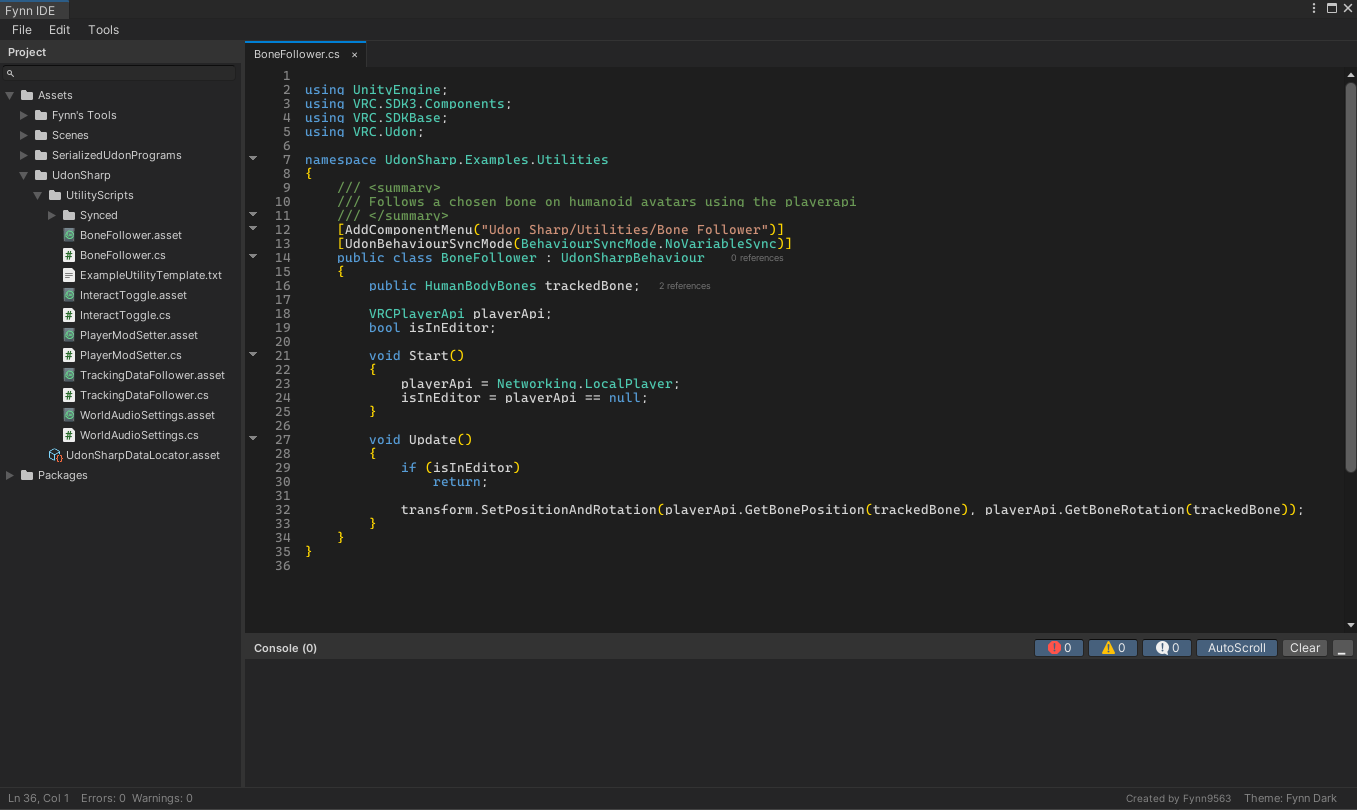
Fynn IDE is a complete code editor docked inside the Unity Editor. Project tree, tabs, syntax highlighting, project-wide search, a console, and fully customisable themes, all in one window you can dock wherever you like.
Press Ctrl+S and Unity recompiles immediately. Compiler errors appear in the built-in console, and double-clicking one jumps straight to the line that caused it.
Made with VRChat creators in mind
- UdonSharp syntax highlighting alongside C#
- New U# Script creates the script and its UdonSharpProgramAsset together, in one step
- Built-in snippet sets for both C# and UdonSharp
- Editor only, so nothing is added to your avatar or world uploads
Writing code
- Tabbed editing with unsaved-change indicators, middle-click to close, Ctrl+Tab to flip back
- Undo and redo that group your typing sensibly instead of one character at a time
- Auto-indent, bracket auto-close, block indent with Tab and Shift+Tab
- Ctrl+/ to comment, Ctrl+D to duplicate a line
- Lightweight completion from your open file, C# keywords, your own word list, and snippets
- Word wrap with Alt+Z, and wrapped lines keep their indentation so nesting stays readable
- Fold classes, methods,
#regionblocks and braces from the gutter, and your folds survive a recompile
Finding things
- Ctrl+P to fuzzy-search every file in the project
- Ctrl+F and Ctrl+H to find and replace, with Replace All as a single undo
- Ctrl+Shift+F and Ctrl+Shift+H to search and replace across the whole project, grouped by file
- Reference counts on classes, methods, fields, and properties. Click one, or press Shift+F12, to see every place it is used and jump there
Console
- Runtime logs and compiler errors in one place, with Error, Warning, and Info filters
- Live counts, AutoScroll, and Clear
- Double-click any entry to open the file at that line
Make it yours
- Three built-in themes: Fynn Dark, Unity Dark, and Twilight
- Import any VS Code colour theme
- Background wallpaper images with opacity control
- A live Theme Editor to build your own, and save it as JSON to share
Nothing gets lost
- Saving preserves your file's existing line endings and encoding
- Unsaved work survives Unity recompiling
- Open tabs come back after restarting the Editor
- If a file changes outside Fynn IDE, you're asked whether to reload or keep both versions
- While the window is focused, Ctrl+S won't save your scene and Ctrl+P won't enter Play mode
Good to know — This is not a VS Code replacement and can't run VS Code extensions (they need a Node.js host that can't exist inside Unity; theme and snippet files are supported however). Completion is deliberately small and fast rather than a language server.
Licence
Your purchase grants a licence for one person to use Fynn IDE. You may install it on multiple computers that you personally own or use.
You may
- Use Fynn IDE for personal and commercial projects.
- Use it for client, commission, employer, and team projects.
- Sell and distribute code, games, Unity projects, VRChat avatars, and VRChat worlds created using Fynn IDE.
- Modify Fynn IDE for your own use.
- Share, modify, and redistribute themes, including themes supplied with Fynn IDE.
You retain full ownership of the code and content you create. No attribution or royalties are required.
You may not
- Share, resell, redistribute, or give away Fynn IDE.
- Share the Unity package, source files, download, or purchase access.
- Include Fynn IDE inside a project or package distributed to another person.
- Upload Fynn IDE to a public repository or public download.
- Use substantial parts of Fynn IDE to create a competing code editor.
Each person who directly accesses or uses Fynn IDE must own their own licence.
Fynn IDE may be stored in a private source-control repository only when everyone with access owns a valid licence.
See the included LICENSE.md file for the complete licence terms.