
SwayBoard: PhysBone feel library & overview for VRChat avatars
商品説明
この商品にはAIで生成されたコンテンツが含まれています。
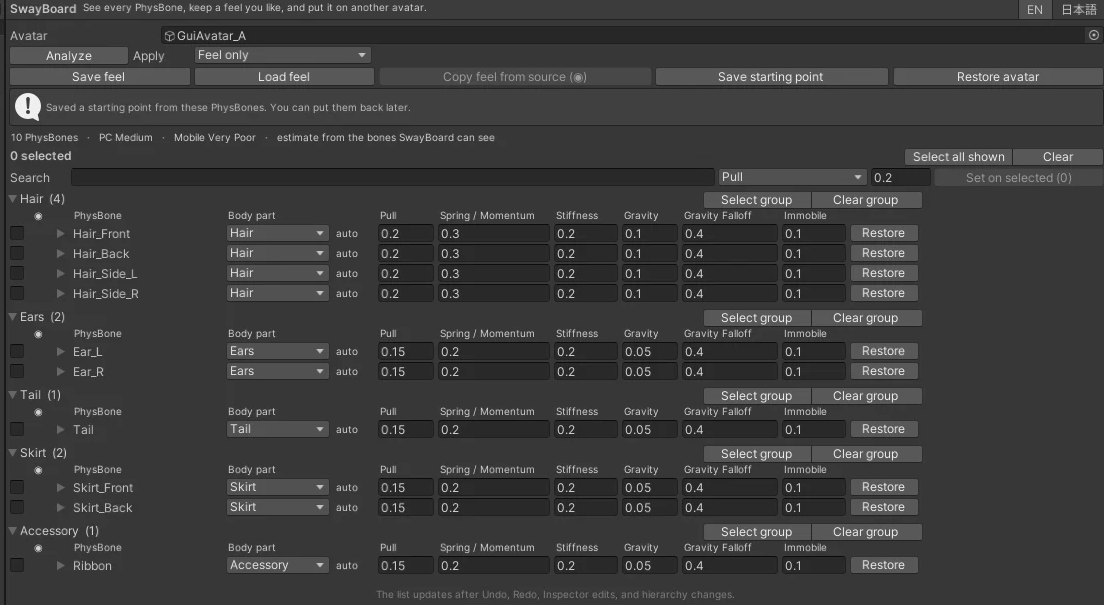
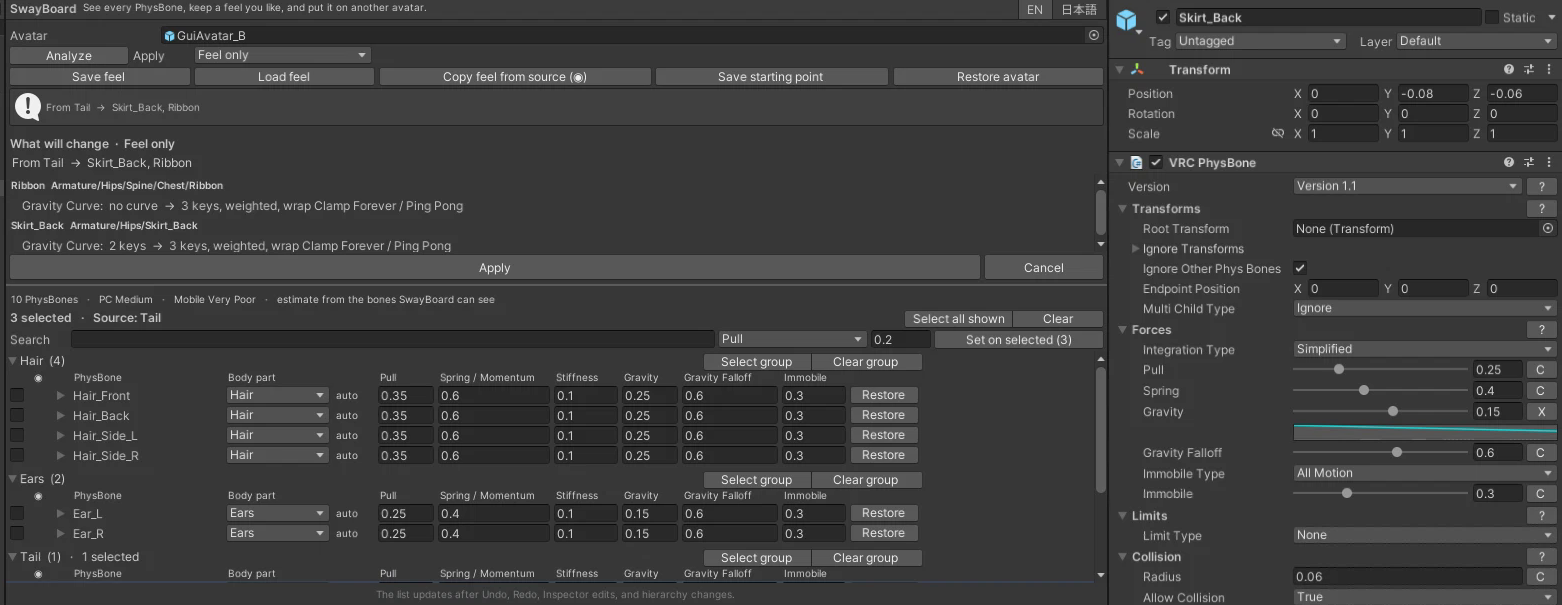
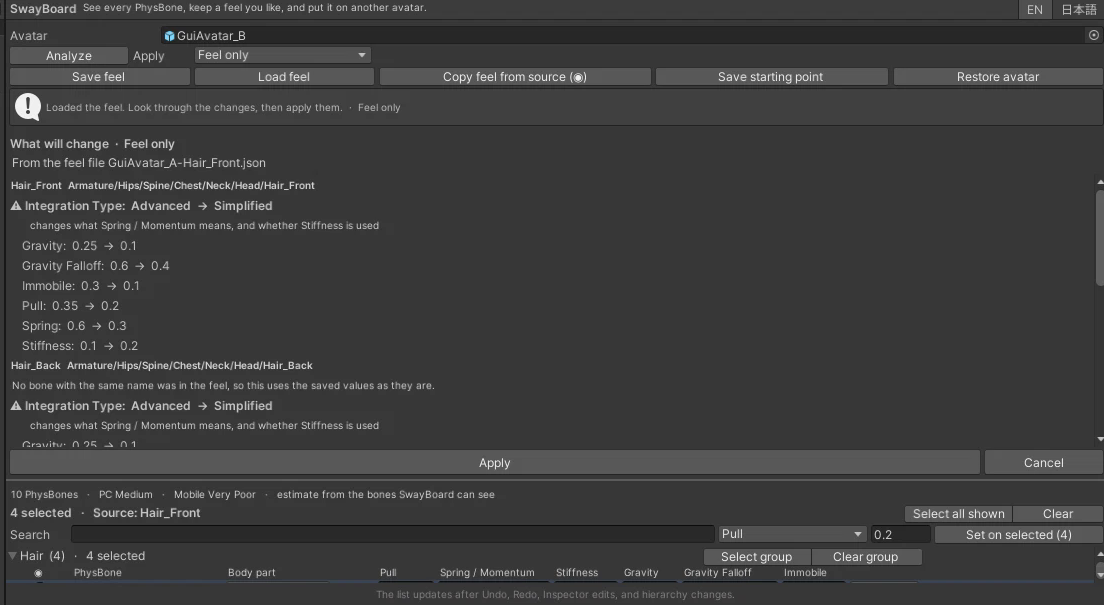
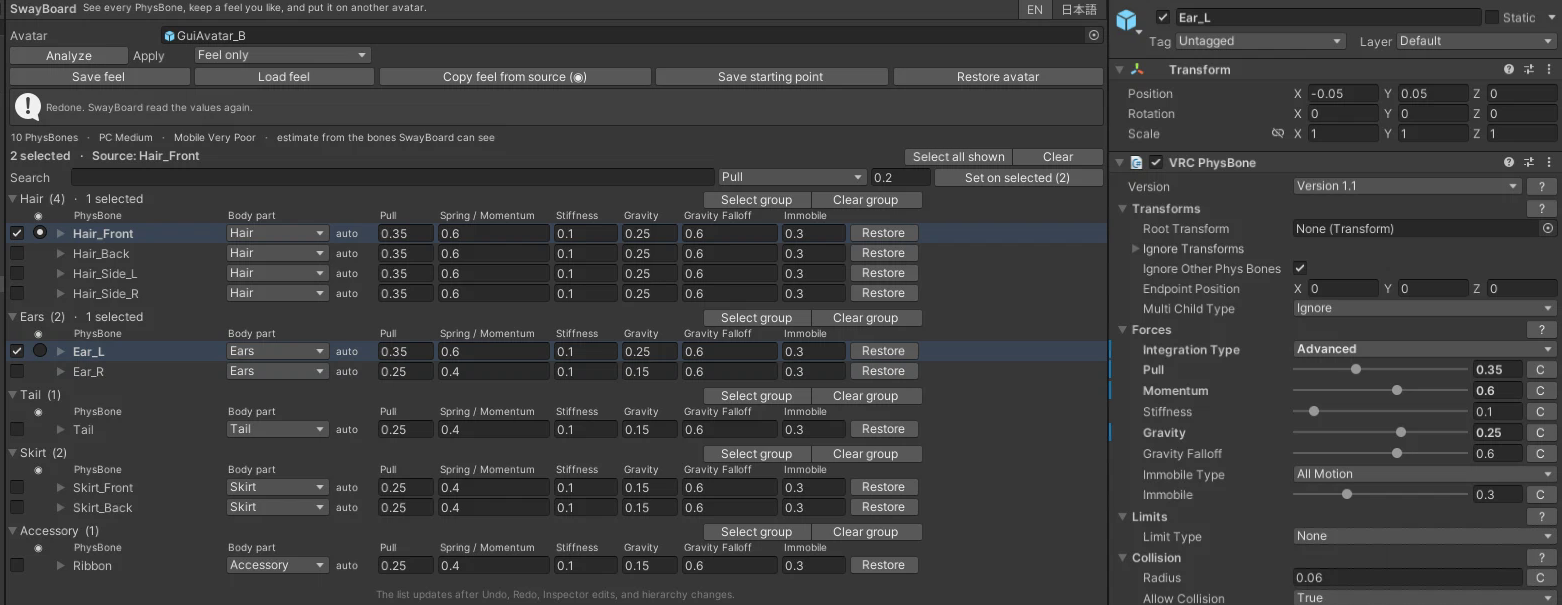
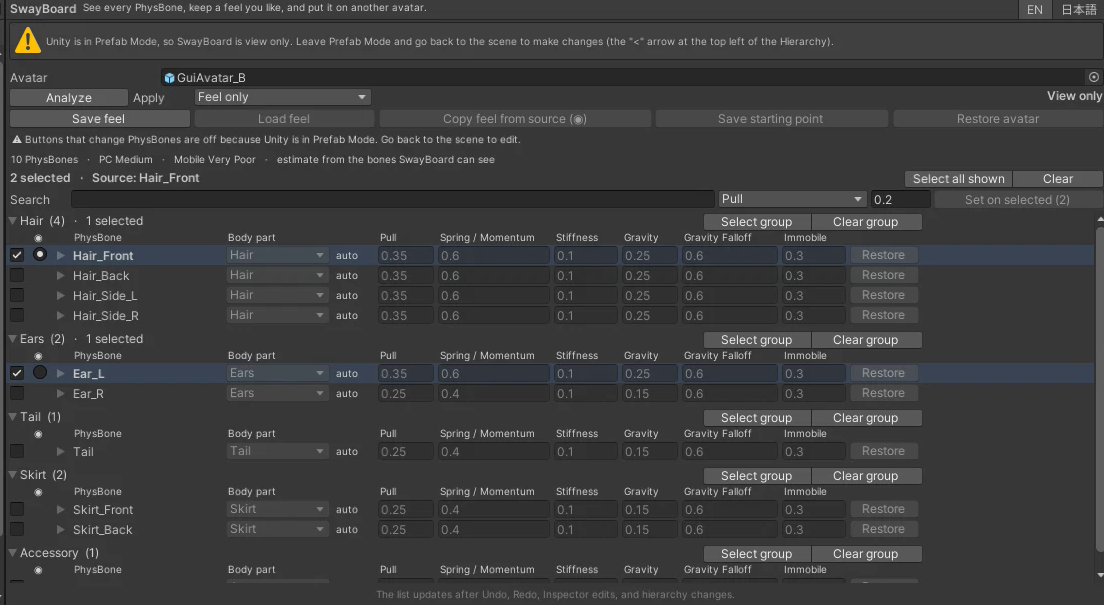
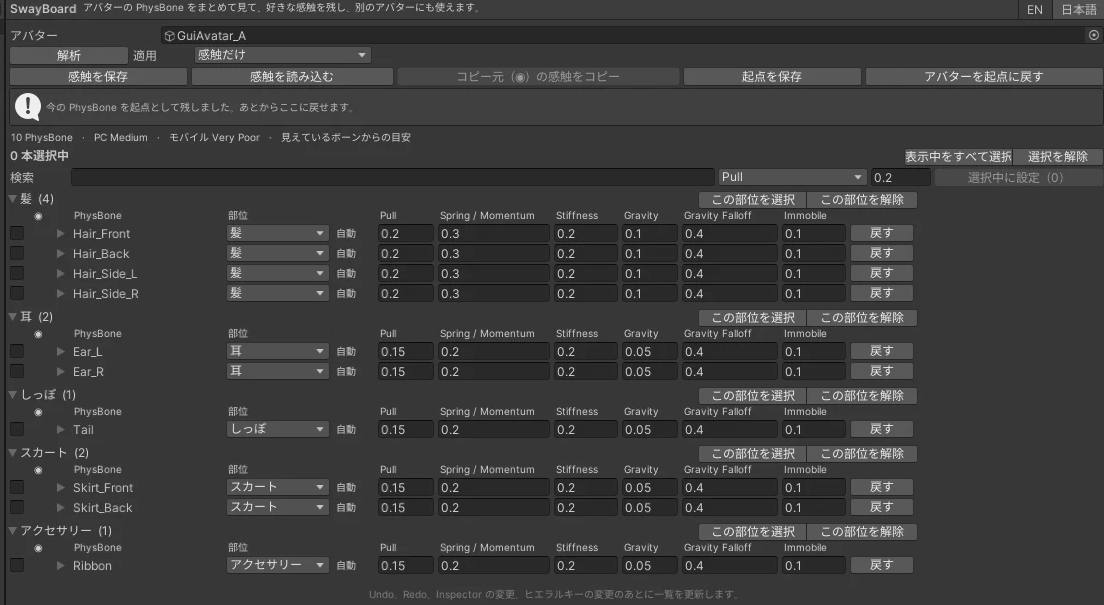
# SwayBoard: PhysBone feel library & overview Product type: Unity Editor tool (.unitypackage), Editor-only Requires: Unity 2022.3 and the VRChat Avatars SDK 3.x (3.10 or newer recommended). Tested with Unity 2022.3.22f1 and SDK 3.10.5. ## In one line See every PhysBone on your avatar in one table, copy a feel you like from one bone or avatar to another with a preview first, and put the original values back whenever you want. ## What it helps with - Hair, skirt, tail and ears are often split into many PhysBones, and checking them one Inspector at a time is slow. SwayBoard lists them all, grouped by body part, with the motion values side by side. - When one bone moves the way you like, you can copy that feel to other bones, or save it to a file and use it on another avatar or outfit. - Before anything is written, you see every value that will change. After writing, SwayBoard reads the bones again and tells you if anything did not land. - The first time you open an avatar, SwayBoard keeps a starting point, so you can experiment and go back later, even after restarting Unity. ## Features - Overview table: Pull, Spring / Momentum, Stiffness, Gravity, Gravity Falloff and Immobile for every PhysBone, including ones that are switched off. Edit values in place, or set one value on all selected bones at once. - Grouped by body part (hair, bangs, ears, tail, skirt, cape / hood, chest, sleeves, accessory). The part is guessed from the bone name, in English or Japanese (standard armature bones like Chest or Head are skipped), and you can change it on any row. - Works when PhysBones are kept on one holder object with Root Transform set: rows are named and grouped by the bone they move. When an avatar and its outfit have bones with the same name, the row also shows which one it is. - Row selection like a normal list: checkbox, Ctrl/Cmd+click, Shift+click for a range, Select group / Clear group, and a selected count. - Copy feel: the source bone is marked ◉, and the preview reads "From Hair_Front → Ear_L". Click ○ on another selected row to change the source. - Feel only by default: copies Integration Type, the motion values and their curves. Radius, angle limits, colliders, grab/pose filters and Endpoint Position stay as they are, because those depend on the size of each bone. Choose "All fields" if you really want those copied too. - Integration Type is listed first and marked in the preview, because it changes what the Spring / Momentum value means. - Curves are copied exactly, including key weights, broken and Constant tangents, and wrap modes. - Save a feel to a file and load it onto another avatar. Bones are matched by their path or name. If the other avatar names its bones differently, a bone takes the feel saved for the same body part (when that part has one shared feel), and the preview says so. A feel from a single bone can be put on any bones you select; without a selection, a hair feel stays on hair. - One Undo puts back a whole copy, batch edit or restore. - Starting point: saved automatically the first time. Restore the whole avatar, or one PhysBone. Replacing a starting point asks first. Bones are matched by their path in the avatar, so a duplicated avatar, an unsaved scene and a reopened project still match. - Safe by default: - Prefab files are view only. - In Prefab Mode and in Play mode, the whole window is view only, with a message saying why. - The list comes back by itself after Play mode. - The small helper component that stores the starting point is marked editor-only for the VRChat SDK, so it is not uploaded and does not block the build. - Rough PhysBone performance estimate (PC / mobile) for the bones SwayBoard can see. - English and Japanese UI. Field names match the VRC Phys Bone Inspector, which is English only; in Japanese mode the Japanese name is shown as a tooltip. - Includes a Soft Hair sample (prefab and feel file). ## How this differs from the Inspector (honest comparison) The VRC Phys Bone Inspector already lets you edit every value, and Unity's Copy Component / Paste Component Values can copy one PhysBone onto another. For a few bones, that is enough. SwayBoard is for when there are many bones: - one table instead of one Inspector per bone; - copying only the feel, without overwriting radius and limits the way Paste Component Values does; - a preview of every change before it is written; - a starting point you can go back to per bone. If you only want quick Soft / Firm presets per body part, a simpler preset tool may suit you better. SwayBoard copies the actual feel you already like. ## Install 1. Install the VRChat Avatars SDK with the VRChat Creator Companion (or ALCOM). 2. Import SwayBoard_v1.0.0.unitypackage: double-click it with your project open, or use Assets → Import Package → Custom Package, then click Import. It installs to Assets/RogerVRTools/SwayBoard. 3. Open Tools → SwayBoard → Open SwayBoard. The window opens as a tab next to the Scene view; drag it anywhere you like. 4. Drag your avatar root into the Avatar field (or have a bone of the avatar selected when you open the window). SwayBoard lists its PhysBones. If the SDK is missing, SwayBoard shows a short message about what to install instead of compile errors. Uninstall: first remove the SwayBoard Avatar Data component from your avatars (otherwise Unity shows a missing script there), then delete Assets/RogerVRTools/SwayBoard. Your PhysBones keep the values you set. ## Limitations - Editor only. Nothing runs in VRChat or in a build. - Edits VRC Phys Bone components in your scene. It does not read animations that change PhysBone values at runtime. - Prefab files are view only; edit the copy in your scene. - Bones are matched by path, name, or body part when loading a feel file. If the saved bones of one part feel different from each other, those bones are not guessed; use the single-bone feel or a manual selection. - The performance estimate covers the bones SwayBoard can see under the avatar root. VRChat's own rank after upload is the final word. - Tested on Unity 2022.3.22f1 only. ## Privacy No network access, no telemetry, no license check. Nothing is downloaded or uploaded. ## License (summary) Single-user license. One purchase lets one person use SwayBoard in projects they create or maintain, commercially or non-commercially, and ship avatars and other content made with it. You may not redistribute, resell or share the tool or its source. Your own avatars and content are not covered by this restriction. Provided as-is, without warranty; please keep backups. The full text is in the LICENSE file inside the package. ## AI-Assisted disclosure AI-Assisted. AI tools were used to write the tool's source code, its documentation (README, changelog, license text), and this product description. How it was checked, all by an AI agent on Linux with Unity 2022.3.22f1 and VRChat Avatars SDK 3.10.5: - 31 automated EditMode tests. - 108 scripted feature checks on test avatars, including real Play mode with Unity's default script reload, Prefab Mode, curves and Undo. - 23 scripted workflow checks on two VRoid sample avatars (their VRM spring bones converted to PhysBones for the test; 12 and 23 PhysBones, one with the PhysBones on a holder object), an outfit nested in the avatar, prefab variants, odd bone names, and a 72-PhysBone stress avatar. - Clean install, remove, reinstall and update in fresh projects, with and without the SDK. - Click-throughs of the window on a Linux desktop (earlier builds of this release, including on the two VRoid avatars; the final layout fixes from that click-through were checked by script only). Not claimed: no human hands-on testing, no testing inside the VRChat client, and no testing on Windows or macOS. The product images are real screenshots of the tool window, only cropped; they are not AI-generated. ## Support Questions or problems: contact me through Jinxxy (the support email is on your receipt and download page). Please include your Unity and VRChat SDK versions and a screenshot of any Console error. ## 日本語(概要) SwayBoard は VRChat アバター用の Unity エディタ拡張です。アバターのすべての PhysBone を部位ごとの一覧で見て、気に入った揺れ方(感触)を別のボーンや別のアバターにコピーできます。書き込む前に変わる値をすべてプレビューし、コピーやまとめての変更は Undo 1 回で戻せます。最初に開いたときの値を「起点」として自動で残すので、Unity を再起動したあとでもアバター全体やボーン 1 本ずつ戻せます。初期設定では感触だけをコピーし、Radius・角度制限・コライダーなどは変えません。プレハブファイル、プレハブ編集モード、Play モードでは見るだけになります。UI は日本語/英語です。 動作環境:Unity 2022.3、VRChat Avatars SDK 3.x(Unity 2022.3.22f1 と SDK 3.10.5 で確認)。 テストについて:開発には AI を使っています。テストは AI エージェントが Linux 上の Unity で行いました。人による操作テスト、VRChat クライアント内でのテスト、Windows/macOS でのテストはしていません.