
MatCheckpoint: Named Checkpoints, Diff & Selective Restore for Unity Materials
商品説明
この商品にはAIで生成されたコンテンツが含まれています。
MatCheckpoint: Named Checkpoints, Diff & Selective Restore for Unity Materials
Product type: Unity Editor tool (.unitypackage), Editor-only Requires: Unity 2022.3 LTS (developed and tested on 2022.3.22f1)
In one line
Take a named checkpoint of a group of existing .mat files, see exactly which properties changed later, and put back only the ones you choose.
Features
- Add a group of existing materials at once: multi-select
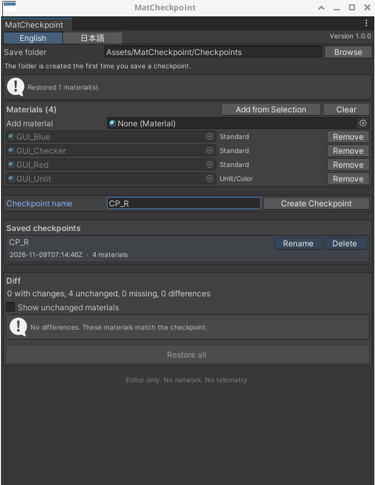
.matassets in the Project window and click Add from Selection, or use the object field. - Create Checkpoint saves the group's current state under a name you choose. The checkpoint is a normal asset in your project, so it survives an Editor restart. Creating one does not modify your materials.
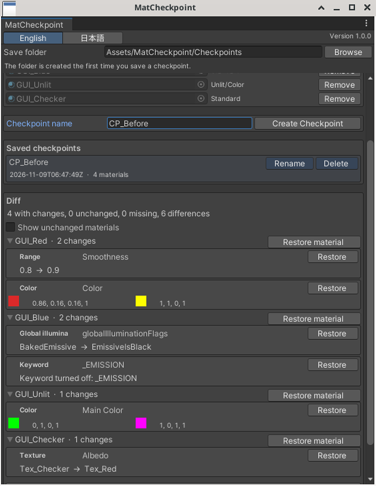
- Per-property diff against the live materials: old value → new value, color swatches, texture names, and enabled/disabled shader keywords, with counts per material and for the whole checkpoint. Only properties that differ are listed; materials with no changes are hidden unless you tick "Show unchanged materials".
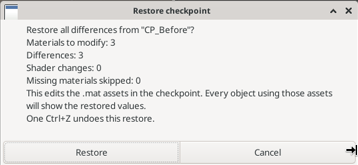
- Selective restore: Restore one property, Restore material for one material, or Restore all (with a confirmation dialog that shows how many materials and differences will change).
- A restore writes the changed
.matfiles to disk immediately and is one Undo step: one Ctrl+Z undoes the whole restore. - Material GUIDs are never changed. No assets are created or deleted by a restore.
- Rename and Delete affect only the checkpoint asset. Delete asks for confirmation.
- Captures floats, ranges, colors (including HDR), vectors, textures (with scale and offset), integers, shader reference, render queue, GPU instancing / GI flags, local shader keywords, and the Material Variant parent reference.
- Handles missing materials and shader changes without throwing errors; the window tells you what was skipped.
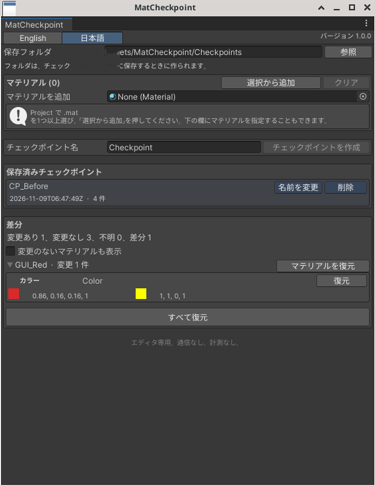
- English and Japanese UI, switchable in the window.
- The material list in the window is remembered per project across Editor restarts.
How this differs from Unity's built-in tools (honest comparison)
Unity already includes Presets and Material Variants, and for some jobs they are enough: - A Preset stores one object. Checkpointing several materials means one .preset file per material. When you apply a Preset you can exclude properties, but Unity does not show a per-property list of what changed since the Preset was saved. - Material Variants show overrides per property and can revert them, but you first need a parent material (a separate copy with its own GUID) and you have to re-parent the material you are editing.
MatCheckpoint adds three things: one named checkpoint for many existing materials at once, a per-property diff you can read, and restore at the level you choose (one property, one material, or everything), without copying or re-parenting your materials. If you only ever need to snapshot a single material, Unity's Presets may be all you need.
Install
- In Unity, choose Assets → Import Package → Custom Package.
- Select
MatCheckpoint-1.0.0.unitypackage. - Keep everything checked and click Import.
The tool is installed as an embedded package at Packages/com.rogervrtools.matcheckpoint. Open it from Tools → MatCheckpoint. No other packages are required.
Uninstall: delete Packages/com.rogervrtools.matcheckpoint. Unity may briefly show CS2001 errors in the Console until it recompiles. These clear on their own.
Limitations
- Editor only. Nothing runs in a player build or in VRChat.
- Works on the values saved in the
.matasset. It does not read MaterialPropertyBlocks, renderer overrides, or animation clips. - Matrices, float arrays, color arrays, texture-stack data, disabled shader passes, and the material's string tag map are not captured.
- For Material Variants, the parent reference and property values are stored. Override locks and the override mask are not modeled, and restoring does not rebuild inheritance.
- Only the material's local keywords are handled. Global shader keywords are untouched.
- Changing a material's shader in Unity can drop or reset properties. MatCheckpoint reports this and restores what it can.
- The tool edits the
.matasset itself, so every object using that material shows the restored values. - After you undo a restore, the previous values are back in the Editor, but the material is unsaved (dirty) until you save the project.
- Not converted or tested for other Unity versions.
Privacy
No network access, no telemetry, no license check, and no data collection. Nothing is downloaded or uploaded.
License (summary)
Single-user license. One purchase lets one person use MatCheckpoint in projects they create or maintain, commercially or non-commercially, and ship content made with it. You may not redistribute, resell, or share the tool or its source. Your own materials and content are yours and are not covered by this restriction. Provided as-is, without warranty; please keep backups. The full text is in the LICENSE file inside the package.
AI-Assisted disclosure
AI-Assisted. AI tools were used to write the tool's source code, its documentation (README, changelog, license text), and this product description. How it was checked: 12 automated EditMode tests in Unity 2022.3.22f1; GUI checks of the Editor window in the Unity Editor on Linux by an AI agent operating the desktop; and a manual Assets → Import Package → Custom Package import of the shipped .unitypackage into an empty Unity project (also by an AI agent on Linux), which completed with 0 Console errors and opened Tools → MatCheckpoint. Not claimed: no human hands-on testing, no VRChat client testing, and no testing on Windows or macOS. The screenshots are real captures of the tool's window, not AI-generated images.
Support
Questions or problems: contact me through Jinxxy (the support email is on your receipt and download page).